
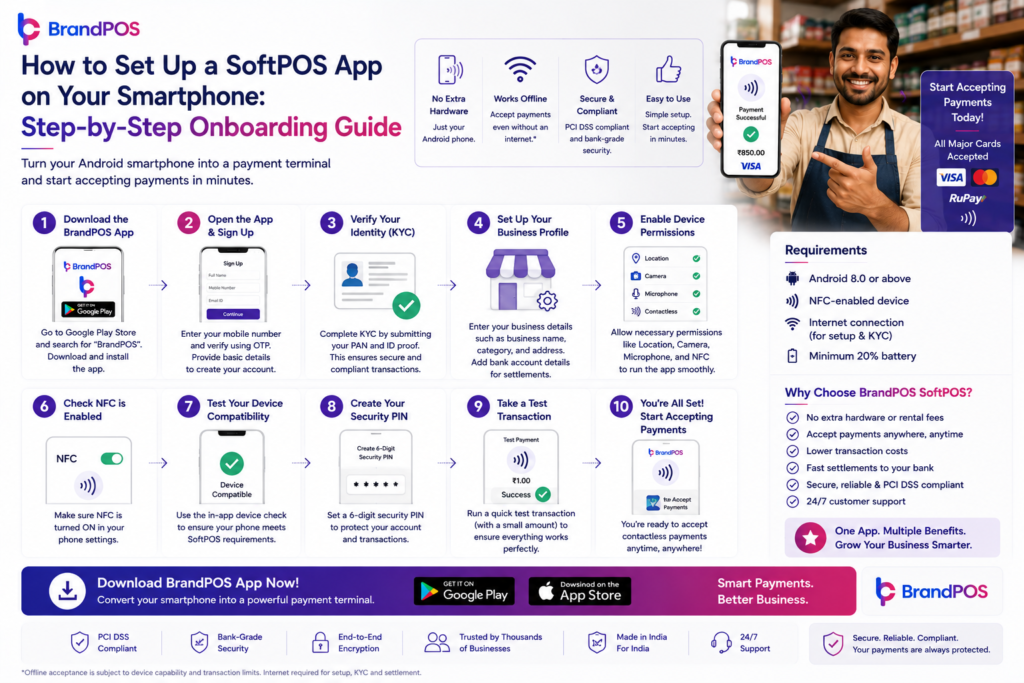
Setting up a SoftPOS app is quick and straightforward. You download the app, complete your business KYC, verify your details, and start accepting contactless payments on your smartphone—often within the same day.
Getting Started: Download and Install the App
The first step is the simplest.
To begin, download a trusted SoftPOS solution on your Android smartphone. You’ll typically find it on the Google Play Store or through a direct link provided by your payment provider.
Once installed, open the app and create your account. This usually involves entering your mobile number, verifying it with an OTP, and setting up basic login credentials.
Make sure your phone supports NFC (Near Field Communication), since this is what enables contactless payments. You can check this in your phone’s settings under connectivity options.
At this stage, you’re just a few steps away from turning your phone into a payment terminal.
Entering Your Business Details and KYC Information
Now comes the part that ensures your account is secure and compliant.
Inside the SoftPOS app, you’ll be asked to provide your business details. This typically includes your name, business type, PAN number, and bank account information where payments will be settled.
You may also need to upload documents such as:
- PAN card
- Aadhaar card or other ID proof
- Bank account proof (like a cancelled cheque)
This process is known as KYC (Know Your Customer), and it’s a mandatory step for all payment systems in India.
It might feel like extra work, but it’s actually there to protect you. KYC ensures that only verified businesses can accept payments, reducing fraud and building trust in the system.
Verification, Compliance, and Approval
Once your details are submitted, the system begins verification.
With SoftPOS, this step usually happens in the background. Your documents are checked against official records, and your account is reviewed for compliance with financial regulations.
This includes KYC and AML (Anti-Money Laundering) compliance, which are essential for keeping digital payments safe and transparent.
In many cases, verification is completed within a few hours. However, depending on the accuracy of your documents and bank checks, it can sometimes take a bit longer.
The key here is to ensure all details are correct and clearly uploaded. Small errors—like mismatched names or unclear images—can delay approval.
Activating Your Account and Accepting Your First Payment
Once your account is approved, you’ll receive a confirmation—usually through the app or SMS.
Now your SoftPOS app is fully active.
To accept your first payment, simply open the app, enter the transaction amount, and ask your customer to tap their contactless card or smartphone on your device.
Within seconds, the payment is processed. You’ll see a confirmation on your screen, and the customer receives a digital receipt.
That first successful transaction is when it really clicks—you’re officially accepting payments without any hardware.
Optional Integrations and Extra Features
After you’re up and running, you might want to explore additional features.
Many SoftPOS solutions allow you to integrate with billing software, accounting tools, or inventory systems. This can help you track sales, manage records, and streamline your operations.
You can also customize receipts, view transaction reports, and monitor your daily earnings directly within the app.
These features aren’t mandatory, but they’re useful if you want to take your business operations to the next level.
A Quick Note on Trust and Compliance
It’s worth understanding why the onboarding process includes steps like KYC and verification.
Payment systems handle sensitive financial data, so they must follow strict regulatory guidelines. KYC and AML compliance ensure that every merchant on the platform is verified and legitimate.
For you, this means:
- Safer transactions
- Reduced risk of fraud
- Greater trust from customers
When your customers see a secure, professional payment process, it builds confidence in your business.
FAQs
1. How long does the onboarding process usually take?
In most cases, you can complete onboarding within a few hours. However, verification may take up to 24–48 hours depending on document accuracy.
2. What documents are required for KYC?
Typically, you’ll need your PAN card, identity proof (like Aadhaar), and bank account details such as a cancelled cheque or bank statement.
3. What causes delays in account approval?
Common reasons include mismatched details, blurry document uploads, or incorrect bank information. Double-check everything before submitting.
4. Can I start using the app before full verification?
Some providers may allow limited access, but full payment functionality usually requires complete verification.
5. Do I need a business registration to sign up?
Not always. Many SoftPOS providers support individual freelancers and small merchants, but requirements may vary based on regulations.