
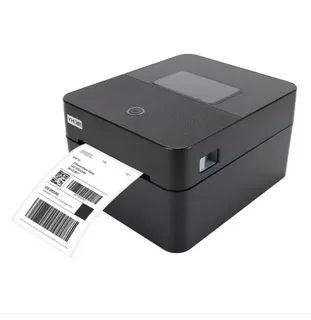
In the modern business world, accuracy, efficiency, and speed are critical for managing inventory, shipping, retail operations, and logistics. One tool that has become indispensable in achieving these goals is the barcode printer. Whether you are a small business owner, warehouse manager, or retail operator, understanding how a barcode printer works and its benefits is essential. But what exactly is a barcode printer, and how does it function? This article explores everything you need to know about barcode printers, their types, technologies, use cases, and tips for optimizing their performance.
What Is a Barcode Printer?
A barcode printer is a specialized device designed to print barcode labels for products, packages, or assets. Unlike regular printers, barcode printers are optimized for printing high-quality, scannable barcodes that can be read by barcode scanners with ease. These printers are used across industries, including retail, healthcare, manufacturing, logistics, and warehousing, to ensure accurate inventory tracking, reduce errors, and streamline operations. A barcode printer typically prints on adhesive labels, tags, wristbands, or receipts, depending on the application. They are built for durability, speed, and precision to meet the demands of high-volume business environments.
How Does a Barcode Printer Work?
Barcode printers convert digital data into machine-readable codes on physical labels. The process involves several key steps:
- Data Input: A computer or software sends product or asset information to the printer. This data usually includes the barcode number, product name, batch number, or other identifiers.
- Encoding: The printer software converts this information into a barcode format, such as UPC, EAN, Code 128, or QR code.
- Printing Process: The printer then uses its chosen technology to transfer the barcode onto a label. Depending on the printer type, this could involve thermal printing, inkjet, or laser technology.
- Output: The finished label is printed on paper, synthetic material, or other media and is ready to be affixed to the product or package.
The result is a clear, scannable barcode that ensures accurate data capture during checkout, inventory management, or shipping.
Types of Barcode Printers
There are several types of barcode printers, each designed for different business needs:
1. Thermal Transfer Printers
Thermal transfer barcode printers use a ribbon coated with ink to transfer the image onto the label. This method produces highly durable labels that can withstand heat, chemicals, and abrasion. Thermal transfer printers are ideal for industrial environments and long-term labeling.
Advantages:
- Long-lasting, durable labels
- High print quality and clarity
- Suitable for harsh environments
Use Cases: Manufacturing, logistics, chemical labeling.
2. Direct Thermal Printers
Direct thermal printers use heat-sensitive labels that darken when exposed to the print head. No ribbon is required, making it cost-effective for short-term labeling. However, labels may fade over time or when exposed to heat and sunlight.
Advantages:
- Simple and low-cost
- Fast printing for high-volume tasks
- Ideal for temporary labels
Use Cases: Shipping labels, receipts, inventory tags.
3. Inkjet Barcode Printers
Inkjet barcode printers function similarly to standard inkjet printers but are optimized for barcode printing. They can print on a variety of label materials and are versatile for low-to-medium volume printing.
Advantages:
- Flexibility in media types
- High-resolution printing
- Suitable for small businesses
Use Cases: Retail, office labeling, specialty products.
4. Laser Barcode Printers
Laser barcode printers use toner to print high-quality barcodes. They offer fast printing and precision, especially for high-resolution graphics and bulk printing tasks.
Advantages:
- Fast printing speeds
- Sharp, precise barcodes
- Suitable for professional environments
Use Cases: Asset management, corporate labeling, office use.
Key Features to Look for in a Barcode Printer
When selecting a barcode printer, consider these essential features:
- Print Resolution: Higher DPI (dots per inch) ensures sharper barcodes that scanners can read easily.
- Media Compatibility: Ensure the printer supports the type and size of labels you need.
- Connectivity Options: USB, Ethernet, Wi-Fi, or Bluetooth connectivity allows flexible integration with business systems.
- Speed: Depending on your volume, faster printers reduce printing time and improve efficiency.
- Durability: Industrial printers are built for harsh environments, while office printers prioritize convenience and compact design.
Choosing the right combination of features ensures your printer meets current needs and future growth.
Applications of Barcode Printers
Barcode printers are versatile tools used across a wide range of industries:
1. Retail
Retail stores use barcode printers to label products with UPC or SKU codes. These labels make checkout faster and inventory tracking more accurate.
2. Warehousing and Logistics
In warehouses, barcode printers create labels for bins, pallets, and packages. Scanners then track items in real-time, reducing errors and improving order fulfillment.
3. Healthcare
Hospitals and clinics use barcode printers for patient wristbands, medication labeling, and lab sample tracking, ensuring safety and compliance with regulations.
4. Manufacturing
Manufacturers print barcode labels for parts, raw materials, and finished products. This allows precise tracking of production lines and inventory management.
5. Asset Management
Companies label equipment and assets with barcodes for inventory control, auditing, and maintenance tracking.
How to Optimize Barcode Printer Performance
To get the most out of your barcode printer:
- Use Quality Labels: Poor-quality labels can fade, peel, or fail to scan.
- Regular Maintenance: Clean the print heads and rollers regularly to prevent streaks or smudges.
- Software Integration: Use compatible label design software for efficient printing.
- Monitor Print Quality: Regularly check labels for clarity and scan reliability.
- Keep Firmware Updated: Manufacturers often release updates to enhance performance and compatibility.
Proper care ensures consistent, high-quality printing and reduces downtime.
Common Problems and Troubleshooting
Even the best barcode printers can face issues. Here are some common problems and solutions:
- Labels Not Scanning: Check print resolution and ensure the barcode format is compatible with scanners.
- Faded or Smudged Prints: Clean the print head and use the correct ribbon or label material.
- Paper Jams: Ensure labels are loaded properly and avoid overfilling the tray.
- Connectivity Issues: Confirm drivers are installed and network settings are correct.
Routine maintenance and monitoring prevent these issues from disrupting operations.
Future Trends in Barcode Printing
Barcode printing technology is evolving rapidly:
- Wireless Printing: Cloud-connected printers allow remote label generation.
- Eco-Friendly Labels: Sustainable materials reduce environmental impact.
- Integration with IoT: Barcode printers increasingly integrate with smart systems for real-time tracking.
- High-Speed Industrial Printers: Faster printers with higher capacity meet growing business demands.
Keeping up with trends ensures businesses leverage the latest technology for efficiency and cost savings.
Conclusion
A barcode printer is a cornerstone tool for modern businesses, enabling accurate labeling, inventory control, and operational efficiency. From retail to healthcare, manufacturing to logistics, the right printer improves productivity, reduces errors, and ensures smooth workflows. Understanding how barcode printers work, the types available, and how to optimize them allows businesses to choose the right solution for their unique needs. Investing in a quality barcode printer and maintaining it properly ensures reliability, efficiency, and long-term value. By selecting the right technology, matching the printer to your usage patterns, and following best practices, your business can enjoy the full benefits of barcode printing.